![Passendo_Secondary_Logo.png]](https://site.passendo.com/hs-fs/hubfs/Passendo_Secondary_Logo.png?height=40&name=Passendo_Secondary_Logo.png)
You can read about Method 1 and see an overview of first-party data targeting here.
Method 2 — Upload a targeting list to a line item
This is a batch approach for campaign-specific audiences. The ESP exports the recipients for a given segment as a hashed list, the list is uploaded to Emperor, and it is then attached directly to a specific line item. At ad call time Passendo checks each reader's identifier against that list and serves (or withholds) the ad accordingly.
Targeting lists have their own section in Emperor, under the Demand menu.
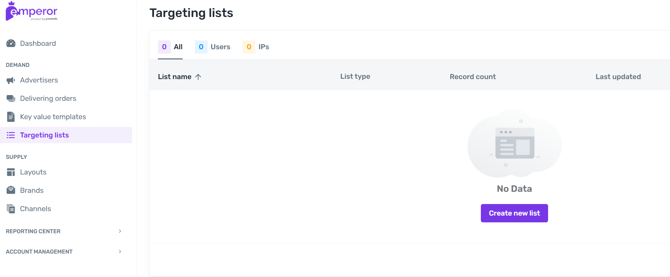
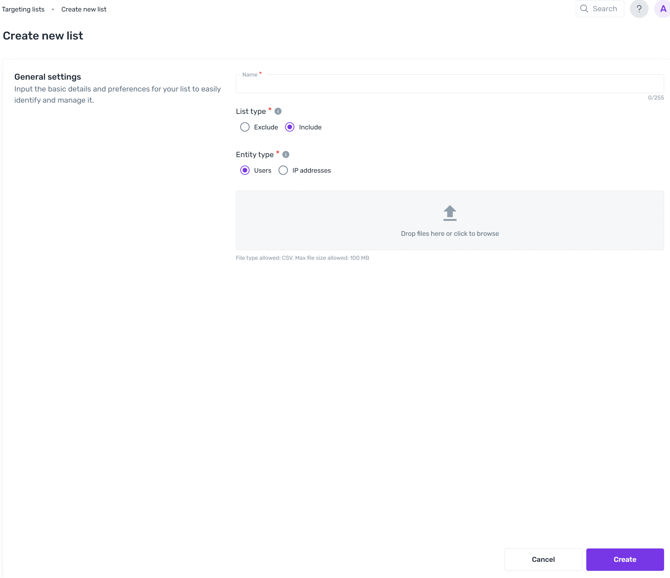
Click Create new list and set the general details:
- Name — so you can find and manage it later.
- List type — Include (serve only to people on the list) or Exclude (serve to everyone except people on the list).
- Entity type — Users or IP addresses. The users list must match the actual values that appear in the URLs (rendered values of the first variable in your tag: it can be user ID, hashed email address, etc.)
- File — drop or browse to a CSV (one column of values, max 100 MB).
Once the list exists, attach it to a line item: open the line item, expand Advanced targeting settings, and under Targeting lists click Add targeting list. From then on the line item only considers (or excludes) the readers on that list.
Method 3 — Attribute list by user ID
This is the most flexible batch approach. Instead of a single column of recipients tied to one line item, the ESP exports a file of user IDs (or hashed email addresses, i.e. what your tag's first variable renders) alongside their attributes in separate columns. The file is uploaded to Emperor, where Passendo stores it as a profile for each ID. At ad call time, any line item can target against any of those stored attributes — the data is not locked to a single line item the way a targeting list is.
Because all the attributes live on the stored list, the implemented tags can be blank of key values: the user ID and the sendout ID in the tag are enough for the server to look up the rest. The same profile then powers targeting across as many line items as you like.
- One file, with contact IDs and their attributes in separate columns.
- Targetable across multiple line items, not just one.
- Tags carry only the user ID and sendout ID; the key values come from the stored list.
- The list must be updated frequently to stay accurate.
Choosing a method
Use Method 1 when the data changes per send and you want it always current, or when you only need a handful of attributes. Use Method 2 when you have a fixed audience for a specific campaign. Use Method 3 when you want to reuse a rich set of attributes across many campaigns and can keep the underlying list refreshed. They are not mutually exclusive — many publishers run more than one at the same time.
Next page: Ad preview (Newsletter simulation)